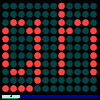
L.E.D. Display
- banner text

This program simulates one of
those large LED displays. Type in Go plus your 'message' to be displayed
enclosed in square brackets.
eg Go [XLogo L.E.D. Display].
The message is printed at the bottom of the screen. A green dot is
added as each vertical line is transferred to the large scrolling
LED display above.
To New
# set default screen, pen and turtle values
ResetAll SetScreenSize [400 400] HideTurtle
SetSC Black SetPC Green SetPS 1 PenUp
End
To Init
# Global list, Display
Make "Display [] Make "Line []
Repeat 11 [Make "Line LPut 0 :Line]
Repeat 12 [Make "Display LPut :Line :Display]
End
To Footer :X
# write value of :X as footer
SetPos [-190 -186]
SetPW 11 SetH 90 SetPC DarkBlue PenDown Forward 378
PenUp SetPos [-190 -190] SetPC White
SetPW 1 SetH 0 Label :X
End
To Draw :Display
# draw grid of LED's in correct color
For [N 1 12] [
For [M 1 11] [
Make "Col Item :M Item :N :Display
SetPC ( List :Col 36 36 )
SetPenWidth 24 Dot List :N*32-210 :M*33-187] ]
End
To Scan :N
# create list from vertical single pixel line in footer
Make "Line []
For [M 1 11] [
Make "Col FindColor List :N :M-192
Make "Line LPut (Item 1 :Col) :Line ]
# draw a green text underscore in footer
SetPC Green SetPW 1 Dot List :N Minus 192
Output :Line
End
To MessageLength :X
# calculate length of message list :X
Make "Length 0
For (List "N 1 Count :X) [
Make "Length :Length + LabelLength Item :N :X]
Output 9 + :Length + 4*Count :X
End
To Go :X
New Animation Init Footer :X
Make "Length MessageLength :X
# stop when whole label length drawn
For (List "N 0 :Length) [
# update display list by removing first and adding last item
Make "Display ButFirst LPut Scan :N-190 :Display
Draw :Display
Refresh Wait 12] # Wait time adjusts scroll speed
End
 Main Command: Go [message]
- Animation
- Art
- Cellular Auto
- Coding
- Demo
- Dot Plot
- Fractal
- Grid
- Illusion
- L-System
- Multi Turtle
- One Line
- Perspective
- Plane Filling
- Polar
- Puzzle
- Recursion
- Sound
- Spiral
- Spirograph
- Trees
- Walks